The different types of cyberattack
Cyber risks are becoming increasingly complex, and now affect all businesses.
> Computer attacks " or " cyber-attacks " refer to any operation carried out intentionally against a computer network, with the aim of causing damage to information and the people handling it. They can be carried out by an individual, a group of hackers, a criminal organization or even a state.
Data theft, ransom demands, image damage or sabotage are all risks that weigh heavily on organizations, often with serious and sometimes irreversible consequences. This reality may still seem theoretical to small businesses, so they are not always sufficiently protected. Yet this is the biggest risk facing small and medium-sized businesses today.
For example, in 2020, 42% of French SMEs suffered an attempted cyber attack.
(CESIN - 7th annual barometer - January 2022)_
1. Phishing
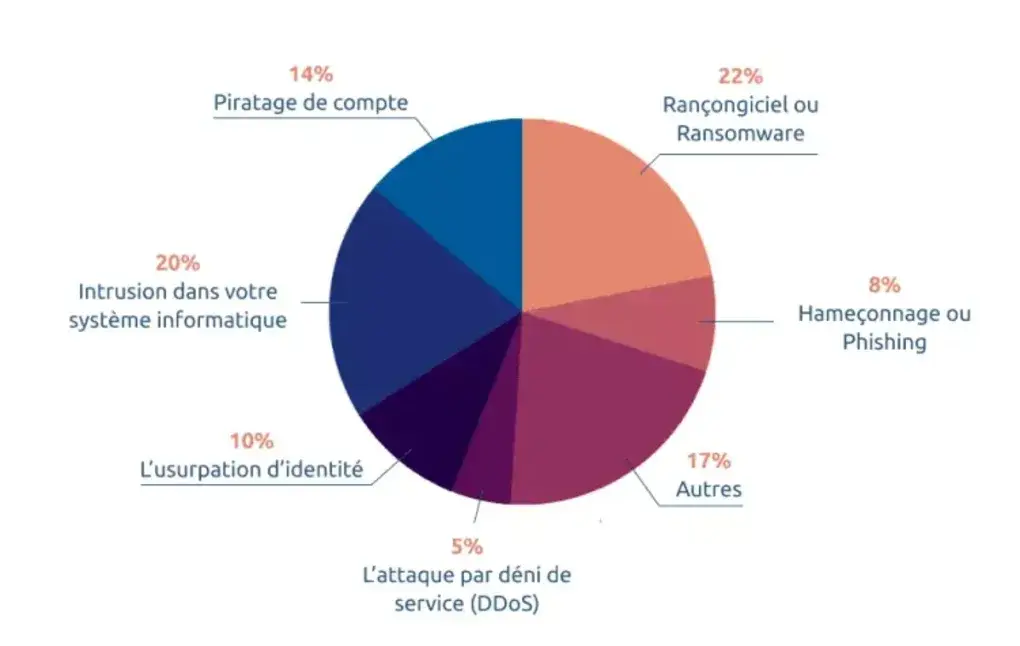
Phishing is a company's main attack vector. It is a fraudulent technique designed to lure an employee into disclosing personal data (access accounts, passwords, etc.) and/or banking information, by pretending to be a trusted third party.
Most often, these attacks are carried out by e-mail: the hacker sends an e-mail to one of your employees, appearing to come from a reliable source, in order to obtain sensitive data or to incite the recipient to undertake a specific action, such as opening an attachment or clicking on a link which will be used to gather information or load malicious software.
> How to avoid it? > - Don't click on any links or attachments if you're not sure of the e-mail's origin. > Pay attention to the spelling of the sender's e-mail. Hackers often use an address similar to one known to your employees, simply by changing a letter or a character.
2. Malware attacks
Malware, including ransomware, spyware, trojans and other viruses, can harvest, destroy and even modify data. It usually takes advantage of a vulnerability to gain access to your computer system.
- Ransomware: It blocks access to your data or hardware, making access possible only in exchange for payment of a ransom.
- Trojan horse: This is a malicious program hidden behind an apparently legitimate program, often serving as a gateway to your computer system for criminals.
> How to avoid it > Install regular software updates to repair security holes.
3. Denial of service (DDoS)
A DDoS attack consists of sending a high volume of traffic to overload the normal operation of a service or network interconnection, making it unavailable.
> How to avoid it?
> Install a firewall on all your computers.
4. Account hacking
Account hacking involves attempts to guess the password of one of your employees, using bots capable of testing hundreds of combinations every minute. All services with a password are exposed, including administrator accounts, company bank accounts, messaging and social networks.
> How to avoid it? > - Use a password manager to generate complex, unique combinations for each service. > Establish a strict and demanding password policy for your employees.
5. Identity theft
Identity theft occurs when someone poses as a member of your company and seeks to obtain information or money from an employee. President fraud is a well-known example, where a malicious individual poses as the company president to obtain a bank transfer to an account outside the company.
> How to avoid it? > - Be aware of the typical characteristics of identity theft, such as requests for international transfers, insistence on confidentiality, and urgency to complete the transfer.
6. Computer system intrusion
A man-in-the-middleattack positions itself between two communicating entities to intercept or alter communications and data. The malicious individual may use a public wifi network or create a false wifi access point to retrieve all information in transit.
> How to avoid it? > - Use encrypted messaging services. > - Avoid public networks, and use a VPN if you need to use public WiFi.
7. Drive by Download
Drive by Download exploits unsecured websites to embed a malicious script that installs malware on a visitor's computer or redirects to another portal controlled by hackers.
> How to avoid it? > Protect your website with HTTPS protocol, which encrypts requests and responses. - Avoid browsing unsecured HTTP sites.
Cyber risk is the number 1 risk for any company, whatever its size.